Bowtie risk software for Mac, iPhone & iPad.

The only native bowtie risk management software for Mac, iPhone and iPad. A modern, Apple-style interface that's intuitive to pick up, with minimal training. Works offline, no account required.

Native Mac, iPhone & iPad
Simple, Apple-Style Design
ISO 31000-Aligned
Offline — No Internet Needed
Free to Start
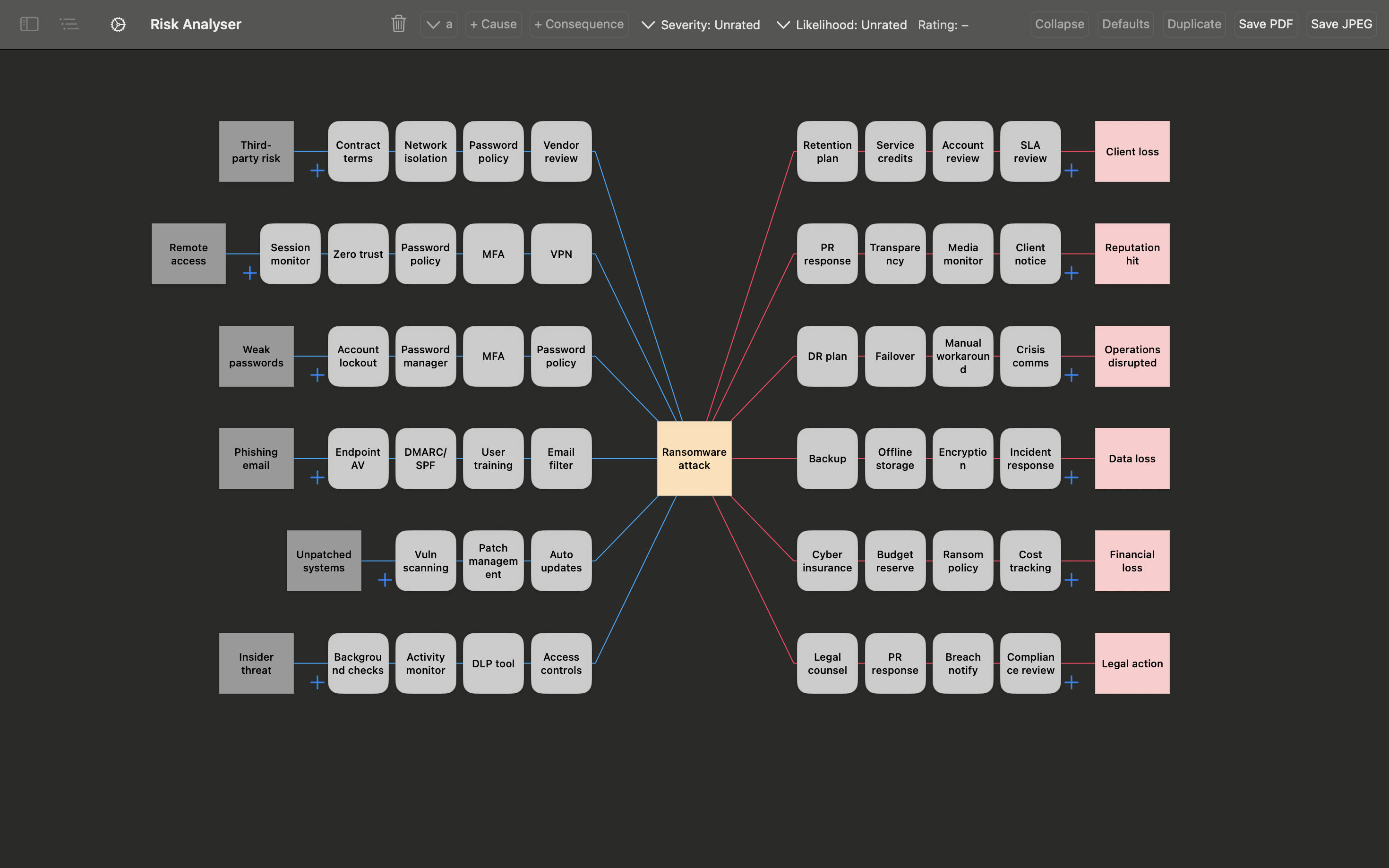
BowTie Risk software on Mac — bowtie risk diagram with threats, controls and consequences
What It Does

Bowtie risk software built for Apple devices.

BowTie Risk is native barrier-based risk assessment software for Mac, iPhone and iPad, designed with the same clarity and simplicity you'd expect from a well-made Apple app.

Conduct risk assessments
Visualise and share risk as an intuitive bowtie diagram
See all your risks at a glance on the dashboard
Generate compliance reports
Align with global standards e.g. ISO 31000
Exchange files easily across Mac, iPad and iPhone
One App, Every Device

Build on Mac or iPad. Carry it on iPhone.

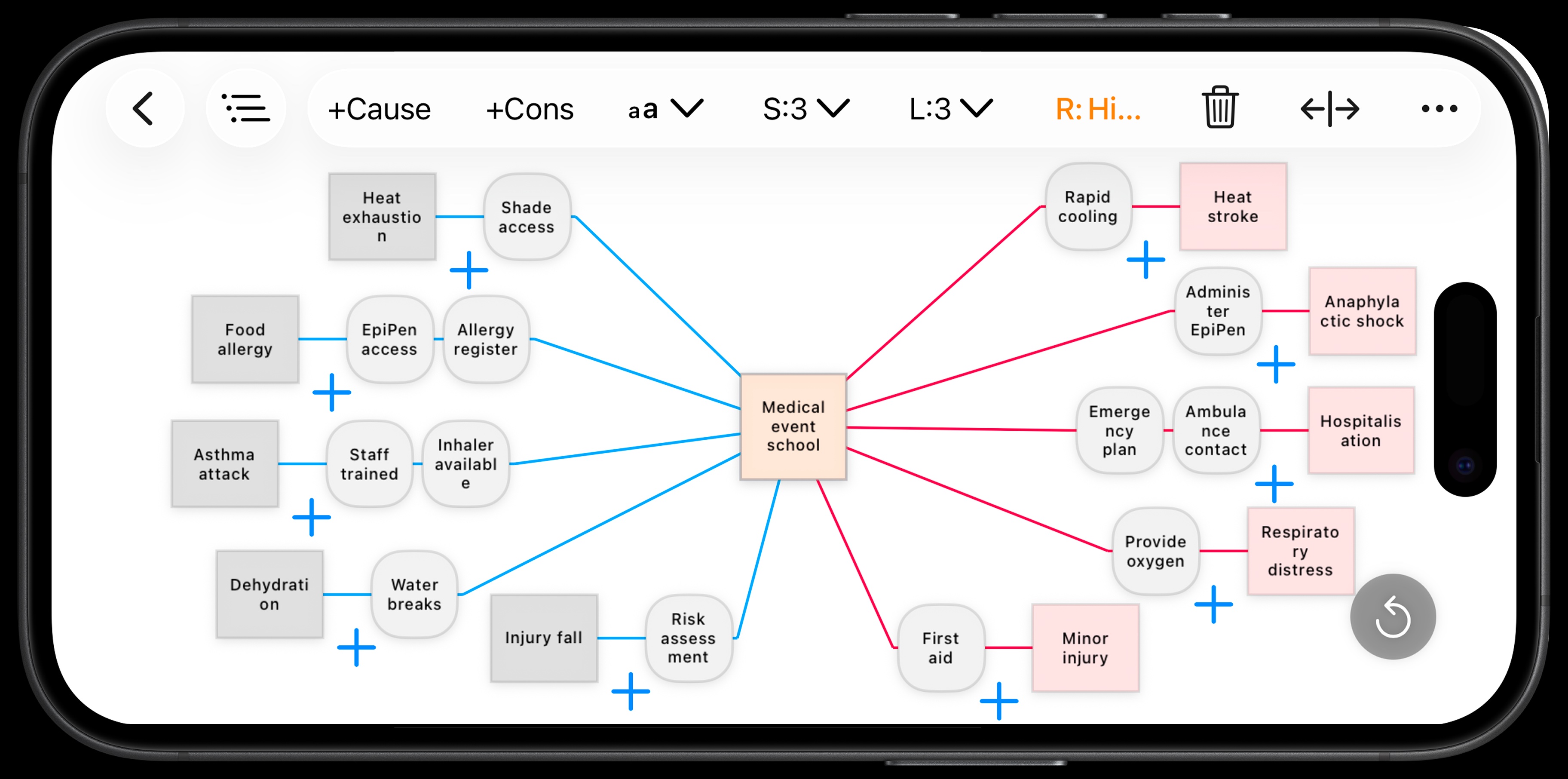
BowTie Risk software on iPhone in landscape — full bowtie diagram

Your diagrams, wherever the work happens

Build on Mac or iPad, then review and share on iPhone — no separate mobile version, files exchange easily between devices.

Capabilities

Bowtie analysis software — professional features.

Everything your team needs to build, manage and report on bowtie risk assessments.

Customisable risk matrix

Tailor likelihood, severity and rating to your organisation's standards.

Compliance reports

Detail and Summary Reports — export to CSV, share with one tap.

AI workflow

Build a complete bowtie in seconds with ChatGPT, Claude or Gemini.

Export anywhere

PDF, JPEG and CSV export. Import from CSV and text.

Private by design

All data on-device. No cloud. No account. No tracking.

Fully offline

Use in the field, on site, or anywhere without internet.

See It In Action

From blank canvas to finished bowtie in under a minute.

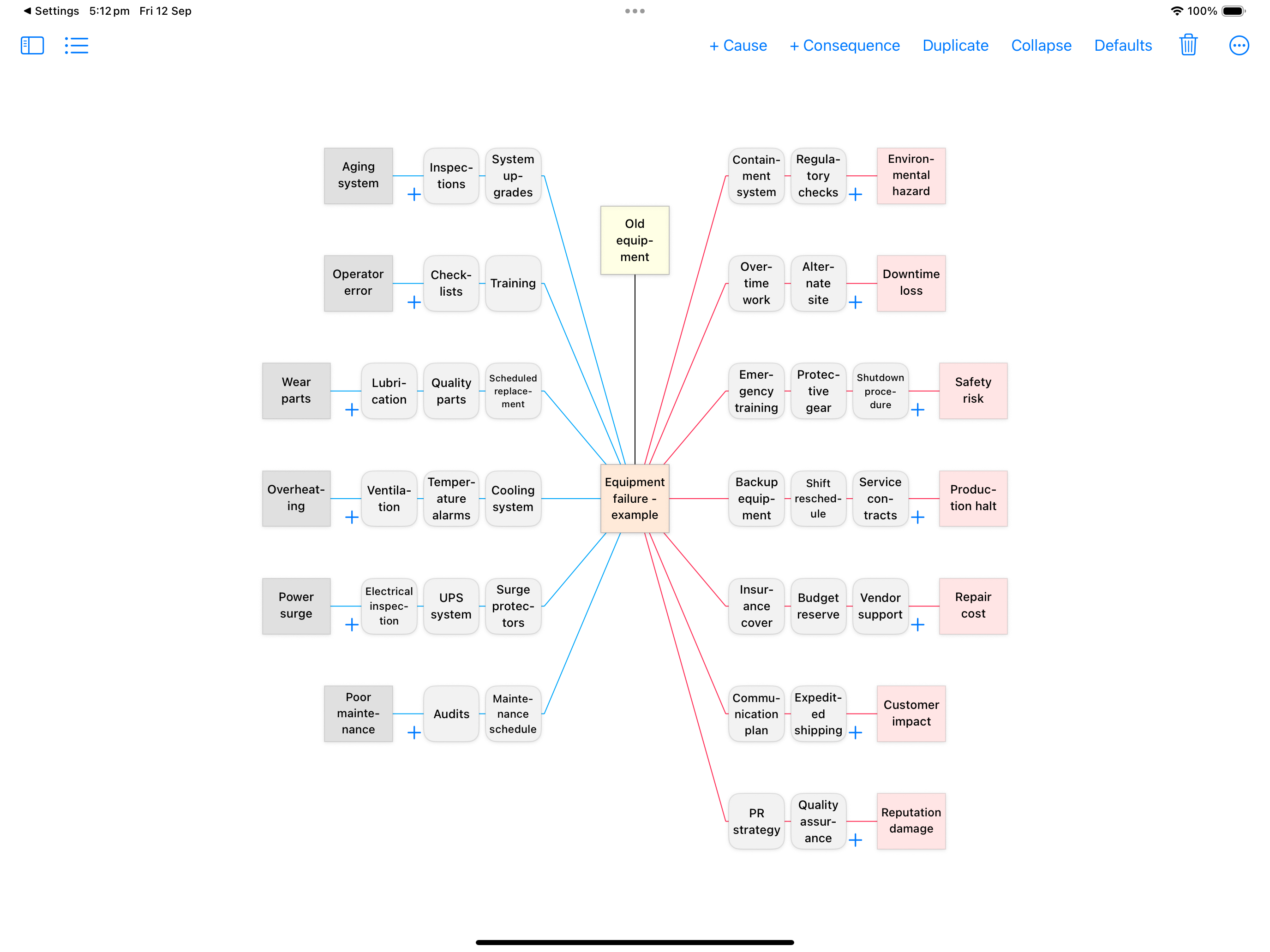
BowTie Risk's AI workflow turns a single hazard description into a complete, structured bowtie — threats, controls, consequences and mitigations — ready to review and refine.

BowTie Risk software on iPad — equipment failure bowtie diagram showing threats, controls and consequences

Equipment failure risk assessment — generated in under 60 seconds using the AI workflow.

How It Compares

Modern, intuitive, and built for the whole team.

Most legacy bowtie software comes with dense interfaces, per-seat pricing, sales calls and weeks of onboarding — whether you're a solo consultant or a risk team of twenty. BowTie Risk is built the way a good Apple app is built: clear enough that a site supervisor, a safety officer and a risk manager can all open it and understand what they're looking at, with minimal training.

BowTie Risk
Clean, modern interface anyone on the team can use
Runs natively on Mac, iPhone & iPad — no browser needed
Works fully offline, no connection required
All data stored on-device — nothing in the cloud
No account, login or admin setup required
Free to start — subscribe only if you need more
Native Apple performance — instant launch, smooth even on complex diagrams
Export to PDF, CSV or JPEG anytime — you own the files
No SSO or identity provider to configure — no app account at all
Distributed via the App Store — Apple Business Manager for multi-seat
Legacy Bowtie Software
Dense interface, usually needs training to use well
Requires account setup and seat licences
Data hosted on vendor servers
Pricing needs a sales call or custom quote
Weeks of onboarding before first real use
Built around the procurement process, not the person using it
Browser-based tools can lag, especially on complex diagrams
Often locked into a proprietary format or the vendor's platform
Cloud versions often need SSO or identity setup, and carry vendor breach risk
Bespoke licensing and subscription models to negotiate and manage
Security & Compliance

Security and compliance, at a glance.

Built for teams and procurement processes that need real answers, not a vague privacy policy.

All data stored on-device using Apple's native storage frameworks
Protected by Apple's on-device encryption, sandboxed like every App Store app
Every release is code-signed and reviewed through Apple's App Store process
Securely distributed via the Apple App Store — no untrusted installers or side-loading
Native Swift performance — instant launch, no lag, no loading spinners
No accounts, no logins, no third-party servers
No analytics or tracking tools of any kind
Aligned with ISO 31000, NEBOSH, IOSH and OSHA frameworks
Subscriptions and licensing handled by Apple — no payment data stored by us
Multi-seat deployment via Apple Business Manager & MDM
No network footprint — no ports to open, no API endpoints to monitor
No vendor risk assessment or sub-processor list required
No ongoing vendor patch cycle — updates ship through the App Store

Full details in our Privacy Policy, or contact us with procurement or security questionnaire requests.

Frequently Asked Questions

Questions about bowtie risk software.

What is bowtie risk software?

Bowtie risk software is a digital tool for building bowtie diagrams — a visual risk assessment method that maps a hazard event from its causes on the left to its consequences on the right, with controls shown in between. Bowtie risk software replaces manual drawing tools and spreadsheets with structured, exportable diagrams, risk registers and reports.

Is BowTie Risk free to use?

Yes. BowTie Risk is free to download with no account required, and lets you create fully editable bowtie diagrams and export them to CSV, PDF and JPEG. A premium subscription unlocks unlimited diagrams, the customisable risk matrix, compliance reports and the AI workflow.

What's the difference between bowtie risk software and a bowtie app?

Nothing functionally — "bowtie risk software" and "bowtie app" describe the same category of tool. BowTie Risk is software in the traditional sense (it manages structured risk data, matrices and reports) delivered as a native app rather than a website, which is what lets it work fully offline.

Does bowtie risk software need an internet connection?

Most cloud-based bowtie software does. BowTie Risk doesn't — it's designed to work fully offline, so you can build and edit diagrams in the field, on site, or anywhere without a connection. All data stays on your device.

Can I import or export my bowtie data?

Yes. BowTie Risk exports diagrams to PDF, JPEG and CSV, and can import structured data from CSV or text — including AI-generated content from ChatGPT, Claude or Gemini using the built-in AI workflow.

Do we need to replace our existing risk management system to use BowTie Risk?

No. Many teams keep their existing system of record for enterprise reporting and use BowTie Risk alongside it — as the fast way to actually build and share a diagram with the people who need to understand the risk, whether that's a toolbox talk, a new starter, or a board briefing. It works well as a lightweight companion, not just a replacement.

Is BowTie Risk suitable for a solo consultant or small team, not just large organisations?

Yes — including risk teams. Most bowtie software comes with per-seat licensing, a sales process and a learning curve regardless of team size. BowTie Risk is designed with the same clarity as a well-made Apple app, so it works just as well for a solo consultant as it does for a risk team or across a whole workforce — a site supervisor, a safety officer and a risk manager can all open the same diagram and understand it intuitively, with minimal training. Download it, open it, and start your first diagram in seconds, with no account and no procurement process.

Is BowTie Risk aligned with ISO 31000?

Yes. BowTie Risk's risk matrix, ratings and reporting structure align with ISO 31000 risk management principles, and the bowtie methodology itself is widely recognised under HSE, NEBOSH and OSHA frameworks.

Download for Mac Download for iPad & iPhone

Free to start · No account or login required · All data stays on your device