Physical Security Risk Assessment

Risk assessment software for physical security and public safety.

Genuinely capable physical security risk assessment software, built for Mac and iPad, with a full-function iPhone version when you're on the go. For facility, personnel and public safety risks. Map threats, barriers and consequences — offline, on-site, completely private.

No Account, No Sales Call
ASIS SRA-2024 · ISO 31000
On-Device — No Cloud
Mac · iPad · iPhone
Download for Mac Download for iPad & iPhone
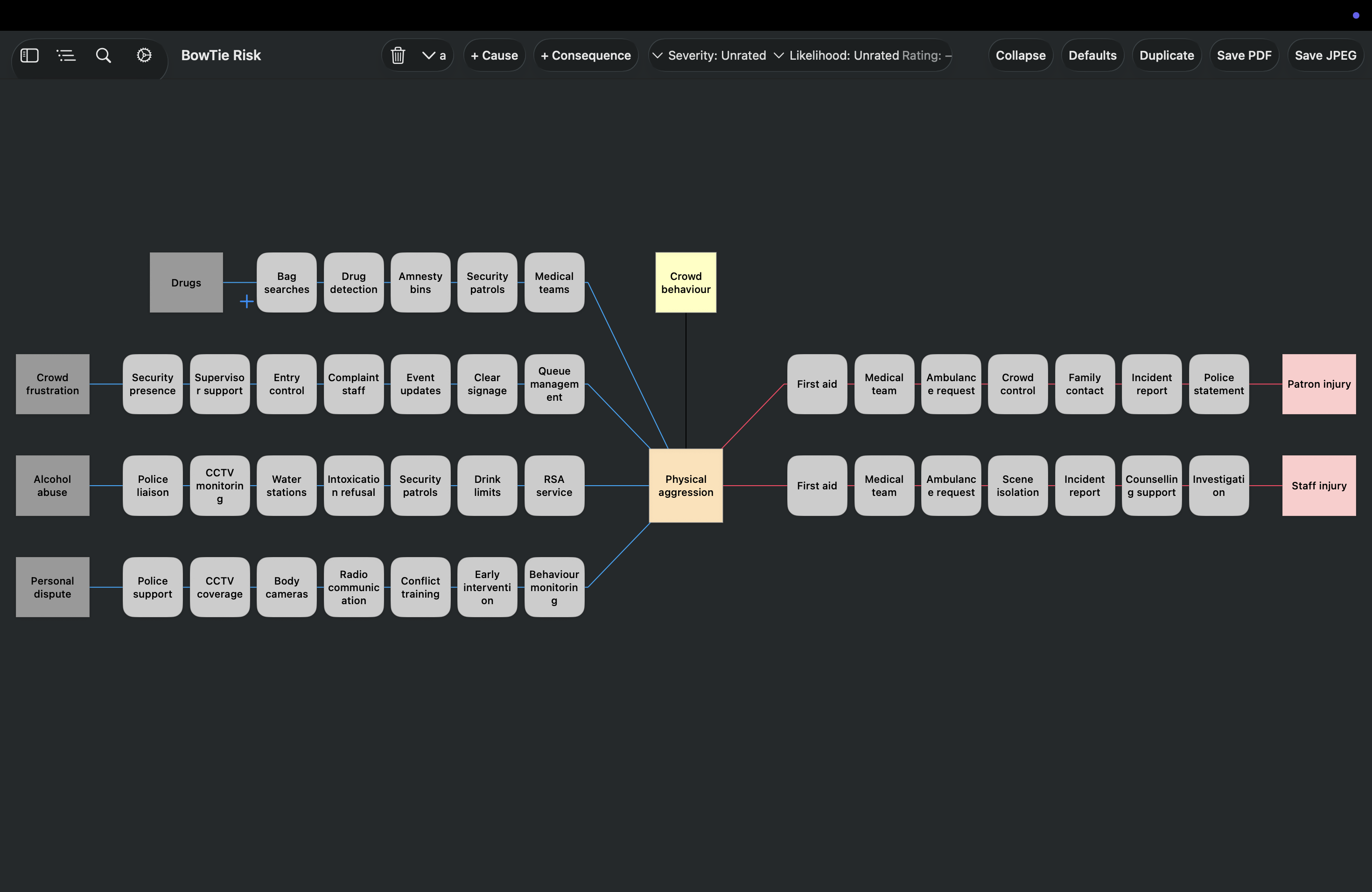
Security risk bowtie diagram in BowTie Risk showing physical aggression at a concert event, with crowd behaviour threats, security controls and consequences mapped
Why Bowtie for Security

The full picture, in one view.

A bowtie diagram lets you demonstrate a comprehensive risk management approach. It maps naturally onto the structured process — risk identification, analysis and evaluation — set out in ASIS International's Security Risk Assessment Standard (SRA-2024) and ISO 31000.

The event — unauthorised facility access, an insider incident, a critical incident at a public event — sits in the centre. Every threat feeding into it sits on the left with its prevention barriers between them. Every consequence flowing from it sits on the right with mitigation barriers between them. A guard, a manager or an auditor can see exactly how each threat is being controlled, not just that a risk was rated.

This applies equally to a corporate security team protecting a facility and to a police service, corrective services or emergency management agency planning for a major event or critical incident response — the same threat / barrier / consequence structure works across both.

Example — Unauthorised Facility Access
Access control Badge audits Perimeter patrols Incident response CCTV monitoring Law enforcement Tailgating through secure entry Stolen or shared access credentials Unmonitored perimeter fence Unauthorised access to facility Theft of assets or IP Threat to staff safety Regulatory or reputational damage THREATS PREVENTION RISK EVENT MITIGATION CONSEQUENCES
Security Risks

Examples of bowtie in use.

Bowtie diagrams work best on risks with multiple causes, layers of controls, and consequences that vary depending on which controls fail. Here's how the method applies across corporate security, public safety and emergency services.

Unauthorised Facility Access

Tailgating, stolen credentials, unmonitored perimeters — each a separate threat with its own controls. A bowtie maps all of them on one page, showing exactly which control gap led to which outcome.

Insider Threat

Insider risks are structurally different from external ones — the controls are behavioural and procedural rather than physical. A bowtie makes that distinction explicit and auditable.

Workplace Violence

Warning signs, access controls, response protocols — a bowtie separates the prevention side (de-escalation, screening) from the response side (lockdown, law enforcement liaison) on one diagram.

Major Event & Public Safety Planning

Crowd control, access points, medical response, evacuation routes — event security involves many interdependent controls. A bowtie gives planners and agencies a shared, single-page reference.

Critical Incident Response

For police and emergency services, a bowtie separates the controls that prevent an incident escalating from the response controls that limit harm once it has — useful for both planning and after-action review.

Asset & Inventory Loss

Theft, diversion and shrinkage usually involve multiple failure points across procurement, storage and handling. A bowtie shows where controls are duplicated and where they're missing entirely.

How It Works

From blank canvas to briefing-ready diagram in minutes.

BowTie Risk is designed for security and public safety professionals who need to move quickly without sacrificing rigour. The workflow is direct.

1

Name the risk event

Define the specific moment you're analysing — "Unauthorised access to server room", "Workplace violence incident in reception", "Crowd crush at event entry point". Specificity matters here — a precise risk event produces a useful bowtie; a vague one produces a vague one.

2

Build the structure

Map the threats feeding into your risk event, the prevention controls between them, the consequences that follow, and the mitigation controls that address each one. Edit and refine as you go — the full structure is visible and adjustable at every step.

3

Rate your risks

Each risk can be given an effectiveness rating. Degraded or failed controls are immediately visible on the diagram. The risk register view shows all your security bowties with sortable risk ratings — which risks are rated, which are unrated, which have control gaps.

4

Export and present

Export your bowtie diagram as a PDF for a full visual record, or export a Detail Report — all controls and ratings — or a Summary Report for briefings and audits as CSV. The visual format communicates the full risk picture to any audience without translation.

Built for Security & Public Safety Professionals

Designed around the realities of security work.

Security and incident data is sensitive, and field work happens where signal doesn't always reach. BowTie Risk is built with that in mind from the ground up.

Completely on-device

All diagrams, risk registers and reports are stored on your device using Apple's on-device storage, unless you choose to save or sync them to another location such as iCloud or SharePoint. Nothing is transmitted anywhere without that choice. Appropriate for incident data and organisations with strict data handling requirements.

Works offline

Remote facilities, event sites, areas with restricted network access — BowTie Risk works without any internet connection. Complete a risk assessment wherever the work is — your data stays on your device the whole time, whether you're connected or not.

Briefing-ready reporting

Export your bowtie diagram as a PDF, and Detail and Summary Reports as CSV, designed to communicate security risk clearly to executives, auditors and command staff. The visual bowtie structure removes the translation layer between field observation and decision-making.

Native on every Apple device

Run a risk assessment on your iPad on-site, review a diagram on your iPhone between patrols or briefings, and build reports from your Mac in the office. One app, all your Apple devices, with iCloud sync available for seamless continuity across devices.

Used by risk professionals in Australia, UK, US and 40+ countries — from corporate security managers to consultants supporting public safety, corrective services and emergency management planning.
Standards & Frameworks

Named in ISO/IEC 31010 as a risk assessment technique.

ISO/IEC 31010:2019, the international standard for risk assessment techniques, lists bow-tie analysis by name among the methods supporting ISO 31000. Bow tie diagrams produced in BowTie Risk are accepted for audit, governance and regulatory purposes.

ISO 31000 ISO/IEC 31010 ASIS SRA-2024 ASIS International

ISO/IEC 31010 places bow-tie analysis in its "analysing controls" family of techniques, as a method for determining whether existing barriers are adequate for an identified risk. ASIS International's Security Risk Assessment Standard (SRA-2024) sets out a structured process for security-specific risk assessment — establishing context, then identifying, analysing and evaluating risk — which the bowtie's threat / barrier / consequence structure maps onto directly. ASIS International holds Category-A Liaison status with ISO, reflecting the alignment between security-specific and general risk management standards.

Frequently Asked Questions

Questions from security professionals.

Is BowTie Risk suitable for physical and facility security risk assessments?

Yes. The app structures threats, causes, controls and consequences using the bowtie methodology, which ISO/IEC 31010 lists by name as a risk assessment technique supporting ISO 31000. It maps directly onto the structured process — risk identification, analysis and evaluation — set out in ASIS International's Security Risk Assessment Standard (SRA-2024).

Is this for cybersecurity or physical security?

This page covers physical security risk assessment — facility, personnel, event and public safety risks such as unauthorised access, workplace violence and perimeter breaches. If you're looking for cyber and information security risk assessment, BowTie Risk also has a dedicated cybersecurity risk assessment page aligned with NIST, ISO 27001 and Essential Eight.

Is this suitable for public safety and emergency services planning, not just corporate security?

Yes. The bowtie structure works equally well for major event security planning, critical incident response, and public safety operations as it does for corporate facility security — the same threat / control / consequence mapping applies regardless of whether the organisation is a private company, a police service, corrective services or an emergency management agency.

Does the app work without an internet connection?

Yes. BowTie Risk is a native app for Mac, iPad and iPhone that stores data locally on your device, so you can complete site assessments, incident reviews and briefings in areas with no signal or Wi-Fi.

How is this different from a spreadsheet-based risk register?

A spreadsheet can record risks, but it can't visually represent the relationship between a threat, its causes, the controls in place and possible consequences. BowTie Risk renders that relationship as a diagram, which is faster to read, easier to present in briefings and clearer for identifying control gaps.

Can multiple team members work from the same risk assessment?

Risk registers and bowtie diagrams can be exported as CSV and shared across a team, so security managers, supervisors and planners can work from the same threat data even if they're not editing the same device simultaneously.

Does the app support custom risk matrices for our organisation's framework?

Yes. The risk matrix editor supports configurable likelihood and consequence dimensions, so you can match your organisation's existing security risk framework or internal scoring model rather than being locked into a fixed scale.

Build your first security bowtie in minutes.

Built for Mac and iPad, with iPhone as a companion.