🔒 Cyber Risk Assessment and Compliance

Risk assessment software for cybersecurity and privacy risks.

Built for Mac and iPad, with a full-function iPhone version when you're on the go. Genuinely capable cyber risk assessment software — map threats, barriers and consequences, offline and completely private.

No Account, No Sales Call
NIST · ISO 27001 · Essential Eight
On-Device — No Cloud
Mac · iPad · iPhone
Download for Mac Download for iPad & iPhone
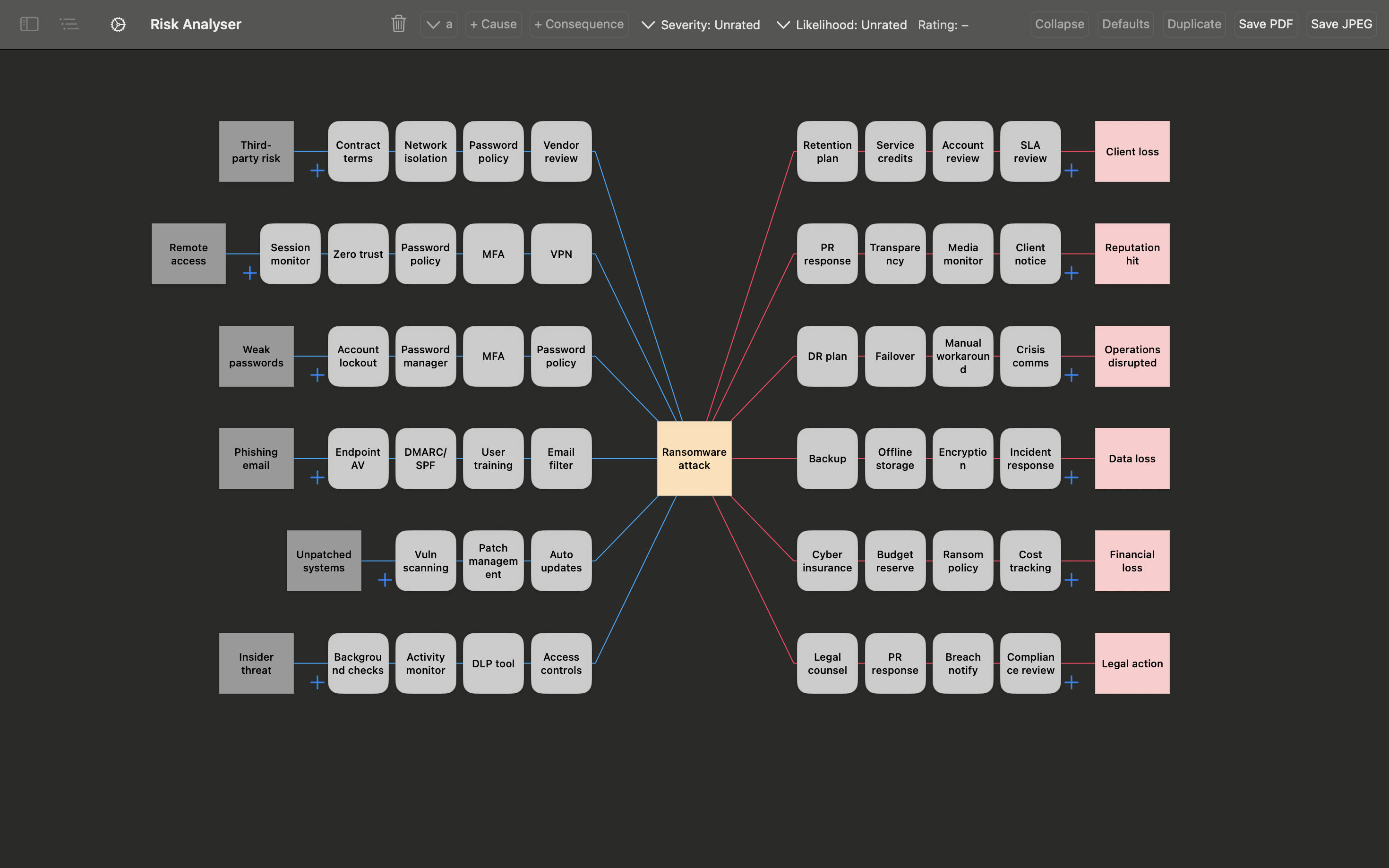
Cybersecurity risk assessment bowtie diagram showing ransomware attack threats, controls and consequences — BowTie Risk app on Mac
Why Bowtie for Cyber Compliance

The full picture, in one view.

A bowtie diagram lets you demonstrate a comprehensive risk management approach. It maps naturally onto what ISO 27001 Annex A expects for risk treatment justification, and the repeatable process NIST CSF is built around.

The attacker's target sits in the centre. Every threat vector feeding into it sits on the left with its prevention barriers between them. Every consequence flowing from it sits on the right with mitigation barriers between them. An auditor or board member can see exactly how each threat is being controlled, not just that a risk was rated.

This matters because the same document has to satisfy very different readers: the SOC analyst who understands every technical detail, and the board director or auditor who needs evidence of a systematic, defensible process. A bowtie diagram is one of the few formats that genuinely serves both — which is why NIST's own implementation guidance illustrates the Cybersecurity Framework using this exact structure.

Example — Ransomware Attack
Email filtering MFA enforced Patch management Incident response Offline backups Cyber insurance Phishing email clicked by staff Compromised credentials Unpatched vulnerability Ransomware deployed on network Systems encrypted ops disrupted Data exfiltrated regulatory breach Ransom demand reputational damage THREAT VECTORS PREVENTION RISK EVENT MITIGATION CONSEQUENCES
Cyber Threats

Examples of cyber threats that demand a bowtie.

Ransomware

Multiple entry points, time-critical response, and consequences that branch into operational, financial and regulatory impacts. The bowtie maps all three dimensions simultaneously — exactly what an incident response team needs.

Phishing & Social Engineering

Phishing succeeds by targeting people, not systems. A bowtie forces you to map human-layer controls — training, verification procedures, reporting culture — alongside technical ones. Most risk registers treat this as a single line item.

Insider Threat

Insider threats are structurally different from external attacks — the prevention controls are behavioural and procedural rather than technical. A bowtie makes that distinction explicit and auditable, which a risk score does not.

Third-Party & Supply Chain Risk

When a vendor's compromise becomes your breach, the question regulators ask is: what controls did you have over third-party access? A bowtie documents exactly that — threat vectors from suppliers, controls on each, and consequences with assigned mitigations.

Data Breach & Privacy

GDPR, HIPAA, the Australian Privacy Act and equivalent laws require you to demonstrate that you understood the risk and had proportionate controls in place. A bowtie diagram is exactly that evidence — structured, visual, and defensible.

DDoS & System Availability

Availability risk is chronically under-documented in most organisations. Bowtie diagrams make the consequence chain explicit — who is affected, in what order, and what recovery controls exist — turning a vague threat into an actionable risk picture.

How It Works

From blank canvas to board-ready diagram in minutes.

BowTie Risk is designed for security professionals who need to move quickly without sacrificing rigour. The workflow is direct.

1

Name the central event

Define the specific moment you're analysing — "Ransomware deployed on network", "Unauthorised access to customer data", "DDoS attack brings down payment systems". Specificity matters here — a precise central event produces a useful bowtie; a vague one produces a vague one.

2

Build the structure

Map the threat vectors feeding into your central event, the prevention controls between them, the consequences that follow, and the mitigation controls that address each one. Edit and refine as you go — the full structure is visible and adjustable at every step.

3

Rate your risks

Each risk can be given an effectiveness rating. Degraded or failed controls are immediately visible on the diagram. The risk register view shows all your cyber bowties with sortable risk ratings — which risks are rated, which are unrated, which have control gaps.

4

Export and present

Export your bowtie diagram as a PDF for a full visual record, or export a Detail Report — all controls and ratings — or a Summary Report for board and executive audiences as CSV. The visual format communicates the full risk picture to any audience without translation.

Built for Security Professionals

Designed around the realities of security work.

Cybersecurity risk data is among the most sensitive information an organisation holds. BowTie Risk is built with that in mind from the ground up.

Completely on-device

All diagrams, risk registers and reports are stored on your device using Apple's on-device storage, unless you choose to save or sync them to another location such as iCloud or SharePoint. Nothing is transmitted anywhere without that choice. Appropriate for sensitive environments, restricted networks and organisations with strict data handling requirements.

Works offline

Secure facilities, air-gapped environments, or simply working on a plane to a client site — BowTie Risk works without any internet connection. Your work is available whenever you need it.

Board-ready reporting

Export your bowtie diagram as a PDF, and Detail and Summary Reports as CSV, designed to communicate technical cyber risk clearly to boards, audit committees and regulators. The visual bowtie structure removes the translation layer between technical risk and business decision-making.

Native on every Apple device

Run a cyber risk workshop on your iPad, review a diagram on your iPhone between meetings, and present from your Mac. One app, all your Apple devices, with iCloud sync available for seamless continuity across devices.

Standards & Frameworks

Part of NIST's Framework Guidance.

NIST's own implementation guidance uses a bow tie to illustrate the Cybersecurity Framework's structure. Bow tie diagrams produced in BowTie Risk are accepted for audit, governance and regulatory purposes.

NIST Cybersecurity Framework ISO 27001 ISO 31000 GDPR CIS Controls SOC 2 Australia's Essential Eight HIPAA NIS2 Directive UK Cyber Essentials APRA CPS 234

NISTIR 8170, NIST's own guidance for applying the Cybersecurity Framework, illustrates the Framework's Identify/Protect and Detect/Respond/Recover structure as a bow tie, and states that bow tie diagrams are commonly used to represent hazards and the proactive and reactive measures that address them. The same structure maps directly onto ISO 27001 Annex A risk treatment requirements, and onto the control effectiveness documentation required under Australia's SOCI Act and APRA CPS 234.

Frequently Asked Questions

Questions from security professionals.

What is a cybersecurity bowtie diagram?

A cybersecurity bowtie diagram is a visual risk assessment tool that maps a specific cyber threat event — such as a ransomware attack or data breach — from its threat vectors on the left to its consequences on the right, with all prevention and mitigation controls shown in between. Unlike a risk register entry or a CVSS score, a bowtie gives security teams and boards a complete, structured picture of a cyber risk on a single page.

How does the AI assistant work for cybersecurity?

You enter a central event — for example, "Ransomware Attack" or "Data breach via third-party vendor" — and BowTie Risk's AI assistant generates a complete bowtie structure around it. This includes relevant threat vectors, appropriate prevention controls for each, realistic consequences, and mitigation controls. The output is fully editable — add your organisation's specific context and remove items that don't apply. It's a professional starting point in seconds rather than hours.

Is BowTie Risk compliant with NIST, ISO 27001 and Essential Eight?

Yes. The bowtie methodology aligns with the risk identification and treatment requirements across all major cybersecurity frameworks — NIST CSF (Identify, Protect, Detect, Respond, Recover), ISO 27001 Annex A risk treatment, CIS Controls, Australia's Essential Eight, GDPR Article 32 risk documentation, and APRA CPS 234. See the Standards & Frameworks section below for how each one references the bowtie method directly.

Does BowTie Risk store data in the cloud?

No. BowTie Risk stores all data exclusively on your device using Apple's on-device storage frameworks. Nothing is sent to external servers. iCloud sync is available for continuity across your own Apple devices if you choose to enable it, but all data remains within your Apple account. This makes BowTie Risk appropriate for sensitive security environments, regulated industries and organisations with strict data handling requirements.

Can I use BowTie Risk for a cyber risk board report?

Yes — it's one of the most common use cases. Export your bowtie diagram as a PDF, and Detail and Summary Reports as CSV. The Detail Report includes the full bowtie with all threat vectors, controls, consequences and ratings. The Summary Report is designed for board and executive audiences — communicating the risk picture clearly without requiring risk management training. Both are board-ready out of the box.

Build your first cybersecurity bowtie in minutes.

Built for Mac and iPad, with iPhone as a companion. Completely private — nothing leaves your device.