Risk Assessment Software
Identify risks, rate them on your own risk matrix, record the controls, and produce risk registers and reports — with an interactive diagram of every risk.
Try it free — no credit card required. Listed on the App Store as BowTie Risk: Risk Analysis for Mac and BowTie Risk: Risk Assessment for iPad and iPhone.
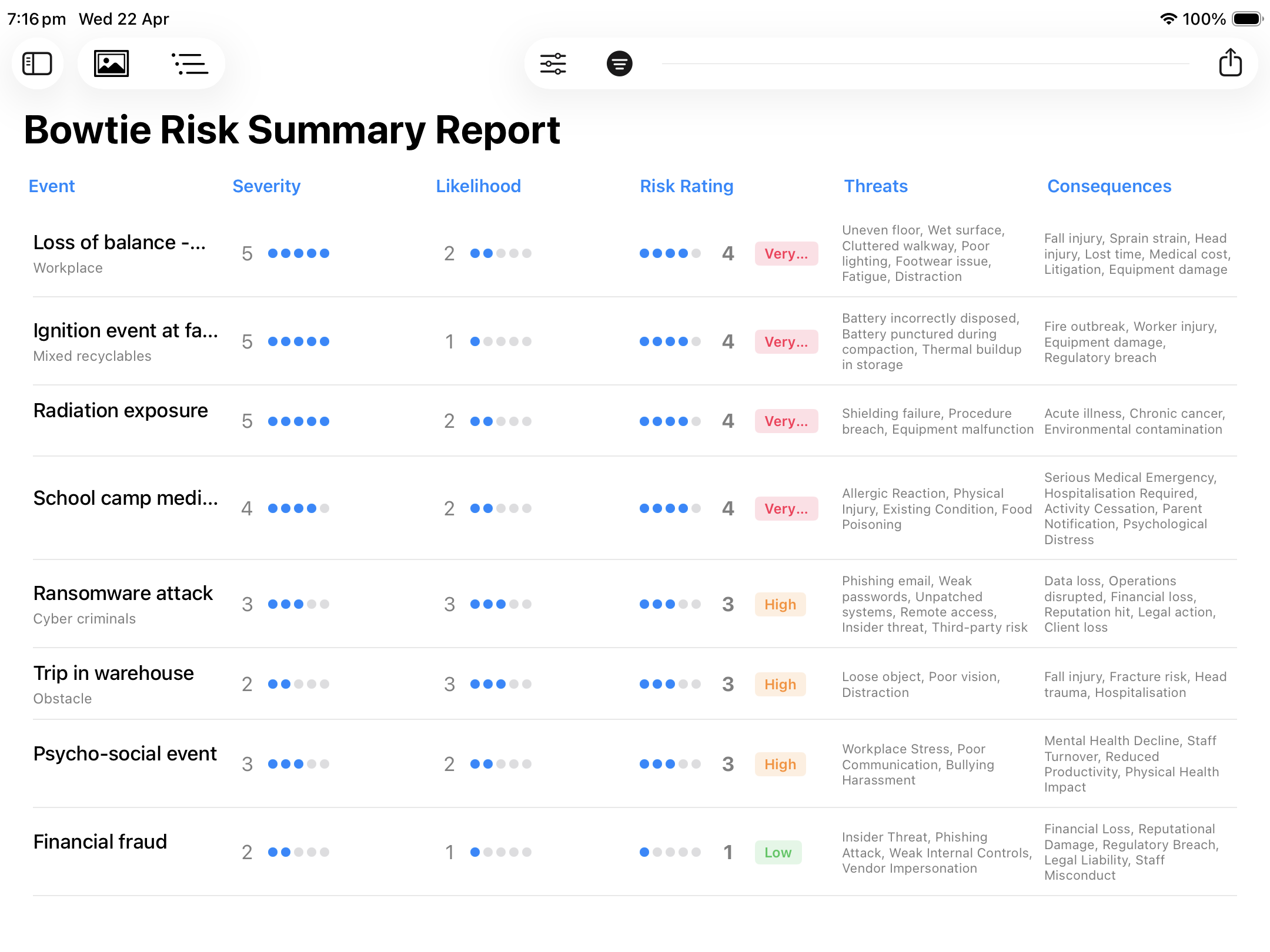
Risk Register Summary Report — iPad
The Process
BowTie Risk follows the familiar risk assessment steps — identify, analyse, evaluate, treat and report — based on risk management principles consistent with ISO 31000.
Name the risk event and record what could cause it and what the consequences would be.
Rate severity and likelihood on a risk matrix you can customise to your organisation's criteria.
Record preventive controls against each cause and mitigating controls against each consequence.
Compare risk before and after controls to see where controls are doing the work — and where gaps remain.
Produce risk registers and professional reports for managers, boards, clients and auditors.
Registers & Reports
Every assessment feeds a referenced risk register and a set of reports, ready for review meetings, audit files and board papers.
Each risk event with its severity, likelihood and risk rating, alongside its causes and consequences.
Each cause-to-consequence pathway set out with the controls that apply along it.
A graphical view of risk before and after controls, showing the effect of each control.
Risk data exports and imports in CSV for use in spreadsheets and other systems. Diagrams and reports export as PDF or JPEG.
Interactive Diagrams
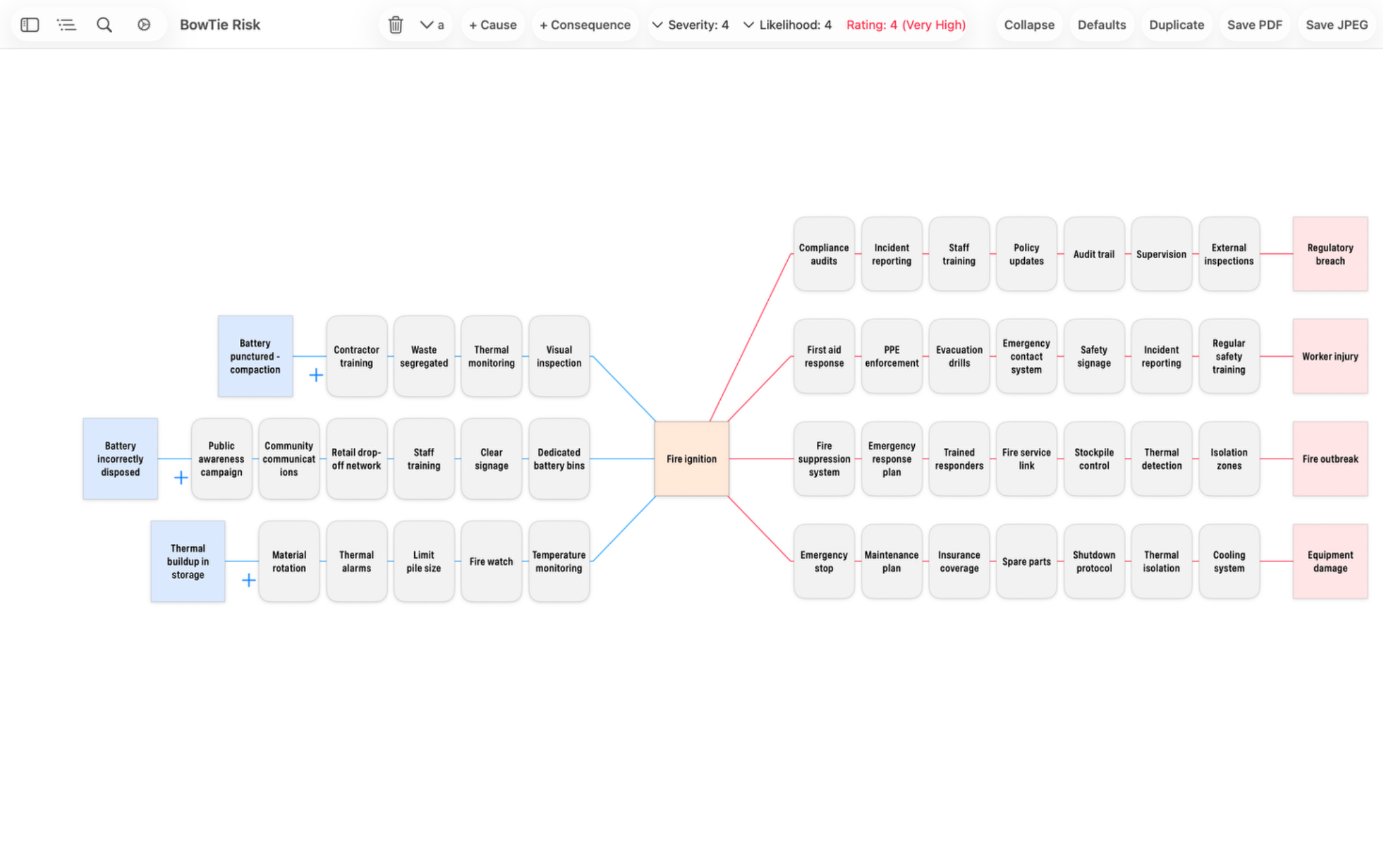
A register tells you how big a risk is. A diagram shows why. Each assessment can be viewed as one picture: causes on the left, the risk event in the centre, consequences on the right, and the controls in between.
Lithium battery fire risk assessment — Mac
This layout is known as a bowtie diagram, widely used in safety, security and operational risk. No specialist knowledge is needed: the diagram is another view of the assessment you have already recorded, useful in workshops and for explaining a risk to people who won't read a register. What is a bowtie diagram? →
At a Glance
Every risk event, cause, control and consequence is totalled in one dashboard, with a breakdown by risk rating that updates as you work.
Who It's For
Consultants, advisers, managers and team leaders. Install from the App Store and start your first assessment the same day — no servers, no accounts and no IT setup.
Applications
FAQ
A risk assessment identifies what could go wrong, analyses how likely and how serious it would be, and evaluates whether the controls in place are enough. The result is usually recorded in a risk register and reported to the people who make decisions about the risk.
BowTie Risk is based on risk management principles consistent with ISO 31000, covering risk identification, analysis, evaluation and treatment. It is not a certification tool.
No. BowTie Risk is designed for anyone responsible for assessing risk — consultants, managers and team leaders as well as risk professionals. You record risk events, causes, consequences and controls, and rate them on a risk matrix. The interactive diagram is a visual view of that same assessment.
Yes. Premium includes a customisable risk matrix so ratings can match your organisation's own risk criteria.
Yes. Risk data exports and imports in CSV format. Reports and diagrams export as PDF, and diagrams also as JPEG.
Yes. BowTie Risk is free to download. The iPad and iPhone version includes two fully editable diagrams and the Mac version includes one. Premium removes the limit and unlocks the full feature set. See pricing →
Free to download for Mac, iPad and iPhone. No credit card required.
Mac and iPad/iPhone are separate App Store apps with separate subscriptions.