Excel Risk Register Alternative
Spreadsheets are a reasonable place to start a risk register. BowTie Risk is where it goes next: structured assessments with linked controls, consistent ratings, and registers and reports produced for you, on Mac, iPad and iPhone.
Used by risk professionals across 40 countries.
Free to download. Premium subscriptions available. See pricing
Where spreadsheet registers start to struggle.
A spreadsheet records risks well. It is less good at showing how each risk is actually controlled, and it gets harder to maintain as the register grows.
Controls sit in a single cell
Controls are often listed together in one column, so it is unclear which cause each control addresses, or whether any cause has no control at all.
Versions multiply
Copies are emailed, renamed and edited in parallel. It becomes hard to know which file is current and what changed between reviews.
Ratings drift
Formulas get overwritten, matrix lookups break and ratings are typed in by hand, so the same risk can be scored differently across sheets.
Hard to read on site
Wide sheets with dozens of columns are difficult to review on a phone or in a workshop, and difficult for workers and managers to follow.
Structured assessments, with the register built for you.
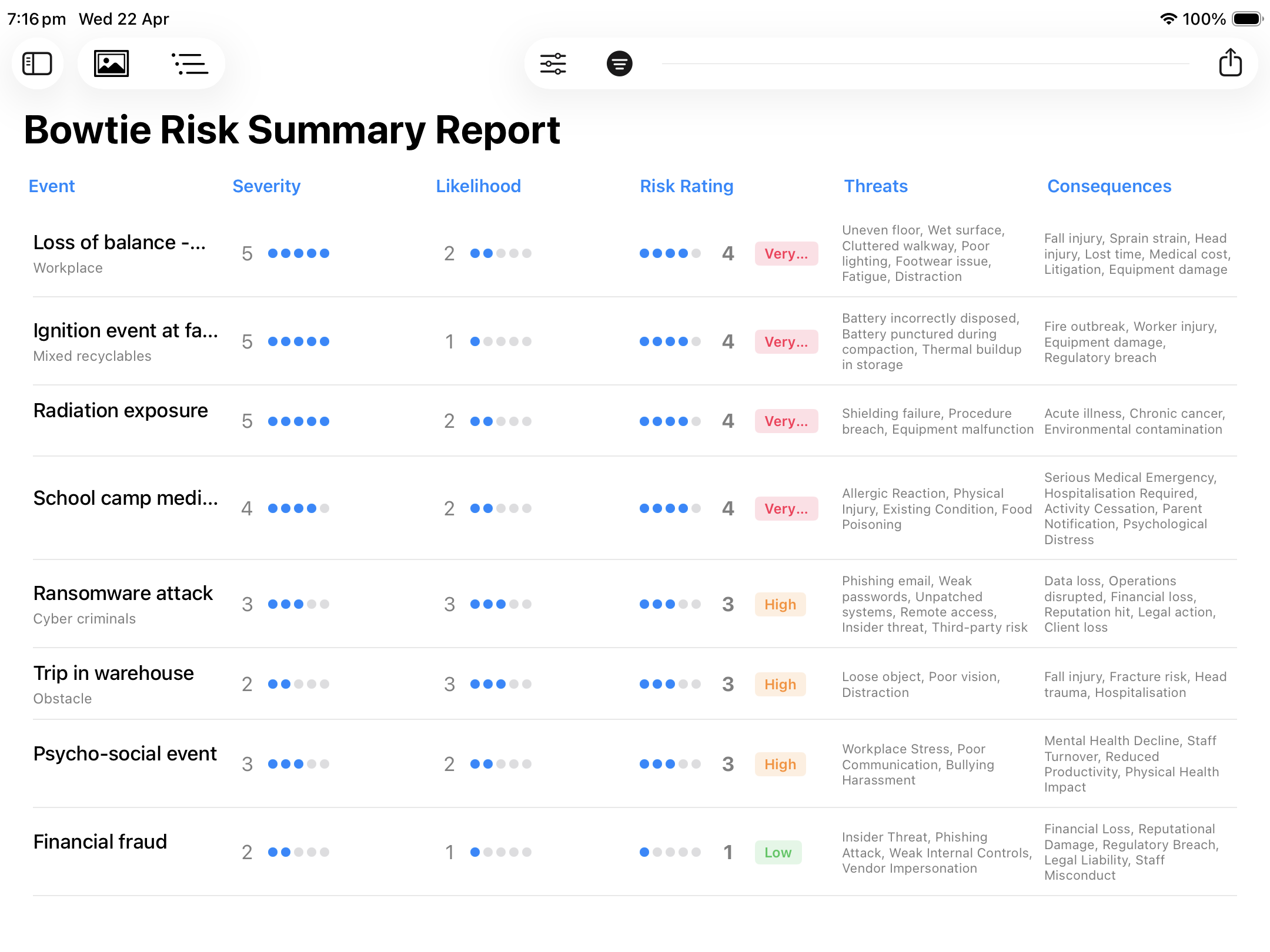
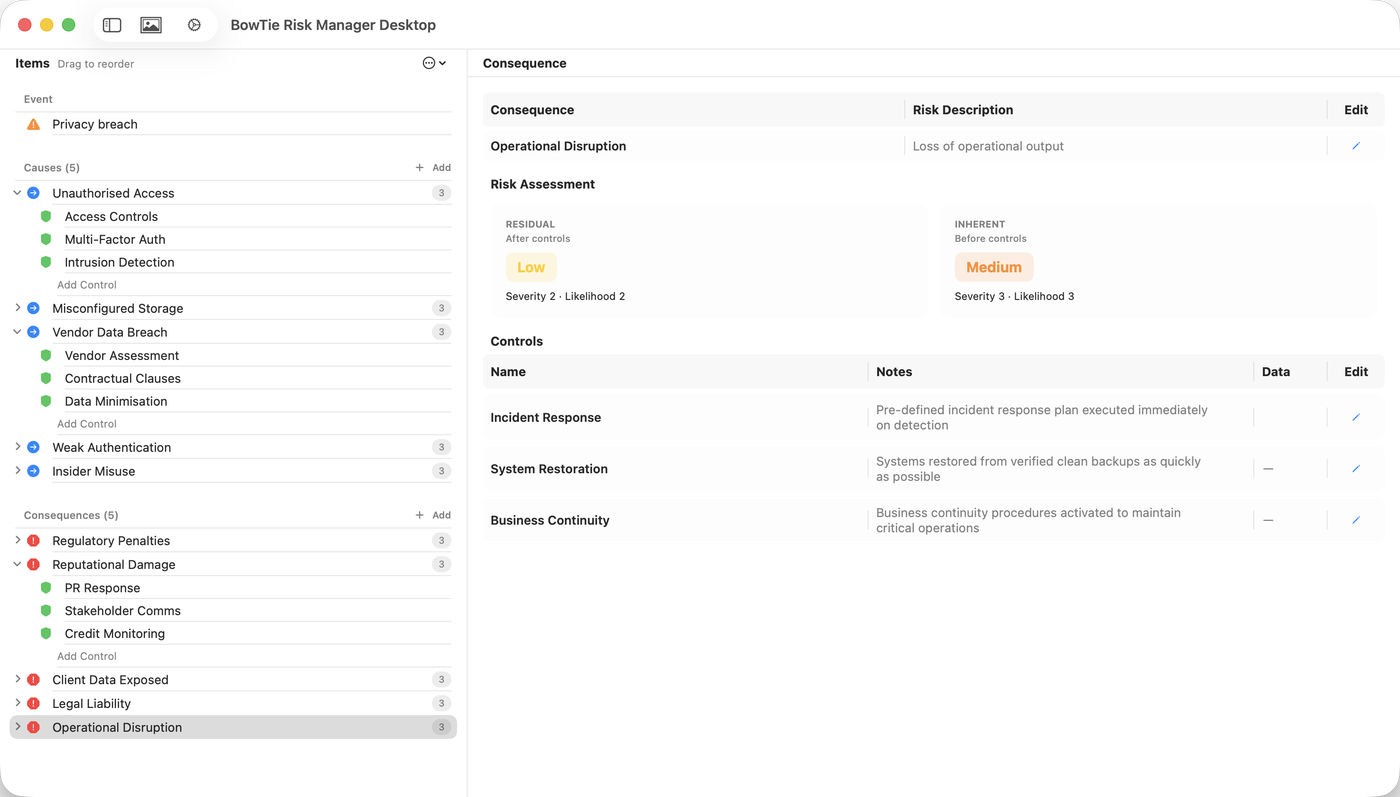
In BowTie Risk you build each assessment once. The register, reports and diagram are produced from it.
One assessment per risk event
Name the event, list its causes and consequences, and record the controls against each one in a simple structured list.
Ratings from your own matrix
Rate severity and likelihood before and after controls using your organisation's scales. No formulas to maintain.
Register and reports produced for you
Assessments roll up into a summary register with inherent and residual ratings, causes and consequences.
Your spreadsheet, created for you
Export to CSV and BowTie Risk creates the spreadsheet, ready to add control owners, dates and actions in Excel. Diagrams export to PDF and JPEG for review packs and reports.
Spreadsheet register vs BowTie Risk.
| Spreadsheet register | BowTie Risk | |
|---|---|---|
| Record risks and ratings | Yes | Yes |
| Controls linked to each cause and consequence | Rarely | Yes |
| Inherent and residual ratings side by side | Manual | Built in |
| Consistent risk matrix | Depends on formulas | Configured once |
| Register, report and spreadsheet | Built by hand | Produced automatically |
| Visual diagram of each risk | No | Generated automatically |
| Readable on a phone | Difficult | Yes, offline |
| Data in and out | Yes | CSV import and export |
| Control owners, dates and actions | Yes | Spreadsheet created by export, ready to complete |
Moving your register across.
You don't need to move everything at once.
- Set up your matrix first. Configure the likelihood and consequence scales your spreadsheet already uses, so ratings stay comparable.
- Start with your highest risks. Rebuild the top few risks from your register as full assessments, with controls against each cause and consequence. For most registers this is the quickest route.
- Import larger registers from CSV. Premium includes CSV import for data set out in the required structure. Spreadsheet registers usually need reorganising first, because each cause, consequence and control needs its own row.
- Fill the gaps as you go. Linking controls to causes often shows where a risk relied on a control that doesn't really address it.
- Keep Excel for what it does well. BowTie Risk creates the spreadsheet from your assessments. Use it as your action tracker: add control owners, review dates and action details, then filter, consolidate or chart the data.
For anyone who has outgrown the spreadsheet.
Safety & HSE teams
Workplace risk registers that show how each hazard is controlled.
Risk managers
Corporate and operational registers with consistent ratings.
Boards & committees
Clear summaries in place of wide spreadsheets.
Consultants
Client workshops and reports without building templates.
Small organisations
A structured register without a large system.
Moving from Excel questions.
Can I keep using Excel alongside BowTie Risk?
Yes. BowTie Risk creates the spreadsheet for you: export to CSV, open it in Excel or another spreadsheet, and add control owners, review dates and action details, or consolidate and report across assessments.
Can I use the same risk matrix as my spreadsheet?
Yes. The likelihood and consequence scales and rating labels can be configured to match the matrix your organisation already uses.
Can I import my existing Excel register?
Yes, with Premium, from a CSV file set out in the required structure. Most spreadsheet registers need reorganising before import, because each cause, consequence and control needs its own row, so many people find rebuilding their highest risks directly in the app quicker.
Do I need to know bowtie analysis?
No. Each assessment is built from a simple list of the risk event, its causes, its consequences and the controls on each. The register, reports and diagram are produced from that information.
Where is my risk data stored?
Assessment files are stored on your device or in storage locations your organisation already uses. No cloud account is required and the app works offline.
Move beyond the spreadsheet.
Designed for Mac, iPad and iPhone.
Microsoft and Excel are trademarks of the Microsoft group of companies. BowTie Risk is not affiliated with Microsoft.